Showing posts with label install. Show all posts

Friday, November 13, 2009

How to install MySQL Enterprise Monitor agents in a failover environment

MySQL Enterprise Monitor is a tool to watch and analyze multiple MySQL environments from a single web based dashboard. More information is available on the MySQL homepage. Each MySQL instance is monitored by a small agent that connects to the MySQL instance and reads statistics that is sent to the MySQL Enterprise Monitor (MEM) Server.
That setup is very easy. But if the MySQL server is in a cluster failover configuration, there are some things to consider when installing the MEM agent:

What do you want?

Do you want to have two entries in the MEM dashboard for both physical servers?
This is good because:
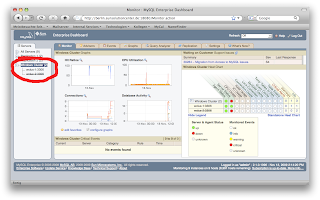
  • You can monitor them separately, you can define different rules for both servers in case they offer different capabilities.
  • You can immediately see, which physical server runs the MySQL instance. The other entry will always report either "MySQL server down" or "MEM agent not reachable".
This is not so good because:
  • You cannot watch the data if a failover occurred. E.g. you can only see graphs for a specific physical host.
  • You get red alarms because the agent on the passive node cannot reach the MySQL instance. This alarm is harmless. But it will train you to ignore red alarms. Not good.
If you like this approach here is the description how to install.

Do you want to see only one entry in the MEM dashboard that displays the data no matter, which physical server is running the instance at the moment?
This is good because:
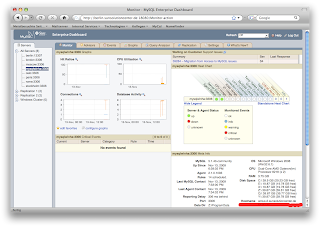
  • You have continuous data even if a failover occurred during the period. E.g. you can watch the cache hit rate graph of your MySQL server and you will see only a dip where the failover took place.
  • You will not see false events like "MySQL server is down on the passive node". Of course it is down. That's why it is called the passive node ;-)
This is not so good because:
  • It's not so easy to see which physical server currently runs the MySQL instance: In the meta info on the dashboard screen you see the physical hostname that runs the MySQL instance.
  • You need to apply the same rules to both physical servers. This may be a problem if they have different capabilities, e.g. if the backup node is smaller.
If you prefer this approach here is the description how to install.
By the way: I recommend this way, as the disadvantages are really small and the installation is even a little easier. Both procedures work for all common HA frameworks like SunCluster, OpenHA Cluster, Linux Heartbeat, Microsoft Windows Cluster.

Installing MEM agent on a cluster on the logical host

The goal is to have only one entry in the Enterprise Monitor Dashboard that shows the status of the MySQL instance, no matter on which physical server in runs. There are two ways to achieve this:
  • You can install the agent on both physical nodes
  • You can install the agent on a shared storage.
In either case you have to make sure, that only one agent runs at a time. You have to integrate the agent into your cluster framework. I will not describe how this works, as it is highly dependant on your cluster framework.

The following description assumes, that you will install the agent on both physical nodes.

  1. Install the agent but DO NOT START the agent yet.

  2. Edit the [agent-installdir]/etc/mysql-monitor-agent.ini
    In the [mysql-proxy] section add the following line:
    agent-host-id=[logical hostname]
  3. Do steps 1. and 2. for the other cluster node as well.

  4. Include the agent in the cluster's failover group so that it will start automatically on that node, where the MySQL instance is running.

  5. Start the agent via the cluster framework.

  6. The entry in MEM will get the hostname of the first node that runs MySQL. Even after a failover this name will stay. You should change that name to the virtual hostname of the virtual ip adress of your MySQL service. Use the MEM BUI, choose the tab "Settings". From the secondary menu right below the tabs choose "Manage Servers". If you move the mouse over the server name a submenu will appear. Choose "Rename" and enter the name of the virtual IP.

Thursday, May 14, 2009

Installing MySQL in Solaris 10 zones / containers

Now that installing MySQL in Solaris zones is even officially supported by the MySQL support group (see http://www.mysql.com/about/legal/supportpolicies/policies-06.html#q03), the question is: What is the right way of installing MySQL in a zone. Of course this depends on what you want to achieve. The following description is based on Solaris 10. On Opensolaris this is different (somewhat easier, as there are no more sparse root zones.)

If you run a local zone as a whole root zone, you can easily install MySQL from tarball or the package installer.

If you run a local zone as a sparse root zone, there are different options:

First you cannot use the package installer, as this procedure will copy binaries to /usr/bin. But /usr/bin is inherited from the global zone and write protected. You have to use the tarball installation.

1. Make /usr/local/mysql writable
The tar ball will install in /usr/local/mysql. You can create a symbolic link in your GLOBAL ZONE:
> ln -s /localsoftware/mysql  /usr/local/mysql
This link points to a directory, that is not inherited. So in every zone /usr/local/mysql will point to a dedicated directory with write permission. You untar the software in the zone in /localsoftware

2. Make /usr/local writable
If you want no software from /usr/local in the global zone to be available in the local zones as well, you can use solution#1 even with /usr/local. So in every zone, /usr is inherited and write protected. But /usr/local points to a directory, that is writable. This is my personal favorit:
In the global zone:
> mv /usr/local /LOCAL
> ln -s /LOCAL /usr/local
and in the local zone
> mkdir /LOCAL
> cd /usr/local
> gtar -xzf /anywhere/mysql.tgz

3. Install in different location
You can untar the MySQL tarball in any other location, that is not inherited from the global zone. Maybe /opt/ ? Check with mount, what directories are loopback mounted from the global zone with read-only flag.

4. Install MySQL globally for all zones
You can untar MySQL in the global zone's /usr/local. Then every local zone has a MySQL installation as well. But then it is important, that all write access in MySQL is done to a writable directory, like /var/lib/mysql. Otherwise MySQL in the local zone will stop, because it cannot write it's logfile/errorfile/datafiles in /usr/local/mysql/data